
At our stand in Dubai a shoe retailer held out her phone and showed me the search that had brought her there: 3d foot pressure scanner. Then she described what she expected to see — a foot she could turn with a finger, a surface she could measure, a file she could send to a workshop. What our system puts on the screen is a different object: a pressure map of a standing foot, a walking sequence, a line drawing of the leg above the ankle, and a video of the person crossing the floor. Her expectation was not unreasonable. It was assembled by a phrase that fuses two product categories into one line of text, and by listings that borrow whichever word is being typed that season. This article separates the two and then stays with the half we make. It covers what the phrase means in the market, what the X3 records function by function, the parts of a session buyers underestimate, and how a shoe match is built out of a record rather than guessed from a photograph. If you came here for a shape file, the second section will tell you quickly that you are in the wrong aisle — which is a useful outcome too.
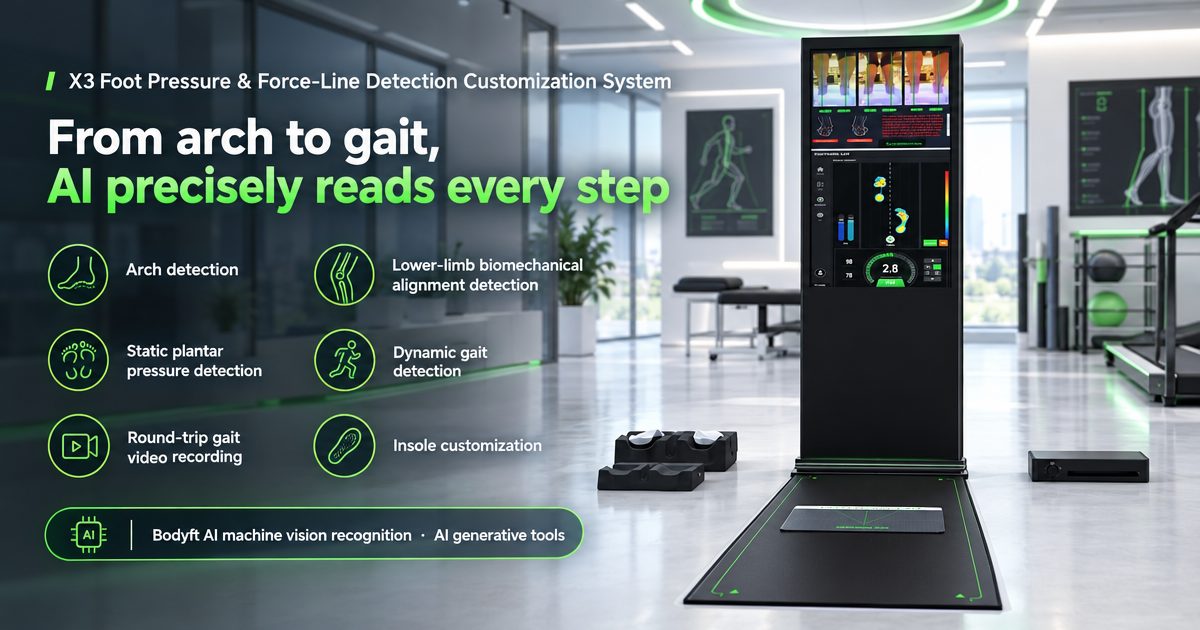
The manual gives the X3 a long name — Foot Pressure And Force Line Detection Insoles Customization System — and the list under it is short enough to read in one breath: foot arch detection, lower limb biomechanical alignment detection, static foot pressure detection, dynamic gait detection, back-and-forth gait video recording and insole customization. Six entries, none of them shape capture. That is the whole article in miniature; the rest is the working detail behind it.
The model in the buyer’s head when the search says 3D
In the listings where the phrase appears, 3D names a capture method rather than a result. Optical rigs, structured light units and contact moulds all end at the same kind of object: a surface — a mesh, a set of points, an outline that can be turned on a screen and measured against a last. Buyers learn the vocabulary there, and they learn it well. By the time someone types a search that pairs that word with pressure, they are usually carrying a clear picture of the deliverable, and the picture has a shape in it.
The two vocabularies fused for a mundane reason. Sellers put the word in front of whatever they list because it is what their buyers type, and a plate listed under a shape term still sells to someone who reads only the first three words of a title. The habit spread until the phrase became a shelf rather than a description. Nothing about that is dishonest in a single listing; it becomes expensive in a purchase order, when a buyer signs for one category expecting the output of another.
A distributor in Brazil put it more directly than I could. He arrived with a printed sheet of what his customers asked for, and one line read “shape, pressure and insole in one visit”. I asked which of the three his customers complained about when a session went badly. He said the third: the appointment ended with advice and nothing to put in the shoe. That answer moved the conversation off capture methods entirely and onto what the room could hand over at the end of a visit.
So the plain statement belongs near the top. We do not make laser scanning hardware, and the X3 does not output a foot surface model — no mesh, no point set, no file for a milling bench. If your next step depends on geometry, this is the wrong category, and we would rather say so in the first reply than during installation. What we build records load and alignment, and that record supports a different set of decisions.
What the X3 puts into the record
The static pass is taken with the person standing still on the plate, weight settled, arms relaxed, eyes ahead. It holds the distribution of load under both feet at rest: where pressure concentrates, how much of the sole is in contact, and how the two sides compare when nobody is asking the person to do anything. Standing still is harder than it sounds for some people, and the prompts on screen exist partly to keep the pose repeatable between visits.
The dynamic pass is taken while the person walks across the plate. That record holds a sequence rather than a snapshot: the order in which regions take load, how long each stays loaded, and the path the centre of pressure travels as the foot rolls through. The system also records a back-and-forth gait video beside the pressure data, so the movement behind the numbers can be replayed instead of reconstructed from memory. When a report is explained to a customer, the video often does more work than the chart, because people recognise their own walk instantly.
Foot arch detection sits between the two, and it is judged with the foot under load — the only condition in which the question means anything. A foot suspended in the air shows a shape that disappears the moment it takes weight. The lower-limb alignment view comes from the camera side of the system and records how the leg sits above the foot as the person stands: the line through ankle and knee, held against the references drawn on the image.
Everything lands in a foot and ankle health database keyed to the person, and the report is assembled from that record with software assistance. It leaves the room three ways: the customer scans a code, gives an email address, or takes a printed sheet. Every report carries a line saying the data is for reference, which is not decoration. It marks where the machine stops and the professional starts, and we keep it on the page even when a customer asks us to take it off.
The arch call and the line above the ankle
Arch type is the item buyers new to this category misread most often, because it sounds like a diagnosis and is not one. The record places the foot in a category — the shape the sole takes under load — and that category describes what was seen, not what it means. Two people with the same arch record can need completely different things, because the record says nothing about symptoms, history, or what the person does for a living.
The alignment view is read the same way. The camera records where the leg sits against the reference lines; the professional sets that beside what they see in the room, the shoes the person wears, and whatever is already known about them. A line that falls outside a band starts a conversation. It does not close one, and it does not tell anyone what to prescribe, however tidy the layout looks on a printout.
What the combination is genuinely good for is comparison. A baseline taken before a course of work, set next to a record taken weeks later under the same routine, shows whether the picture moved and in which direction. That is a modest claim next to the ones some listings make, and it is the claim the hardware can carry. The clinic that gets value from an X3 is usually the one that captures the second record, not the one that admires the first.
Repeatability is where these records quietly fail. On a support call, a clinic sent two reports from the same patient, three weeks apart, that looked like two different people: one operator had used the armrest, the other had not, and the walking pace differed enough to change the load sequence. Nothing was wrong with the machine. What was missing was a written routine — same stance, same pace, same number of passes — applied by everyone who touches it. That document costs nothing and is worth more than most upgrades.
How a shoe match is built out of a record
Shoe matching on the X3 runs through a catalogue that the store or clinic enters and maintains. Each shoe record carries what the system needs in order to reason about fit: the model, the size run, and the characteristics that decide whether a given foot and a given build will sit well inside it. The system then returns shoe models from that catalogue against the recorded data. It is a shortlist, not an answer, and the difference matters at the counter.
It has to be a shortlist for a structural reason. The recommendation can only see the catalogue it was given, so a store with forty models entered gets answers drawn from forty, and a store with four gets answers drawn from four. Buyers who expect the feature to work on the first morning, before any catalogue work, are usually the ones who later report that it does not work at all. The stores that use it well treat data entry as a weekly task, the way they treat a price change on a shelf.
Where the record and the shoe disagree, the shoe wins. A recommendation can point at a model that suits the load pattern and still be wrong for the person in front of you, because the shoe has to accommodate the foot as it is, in the socks it is wearing, at the width it actually is. The fitter tries the pair on, watches the heel seat, asks the person to walk, and overrules the screen when the screen is wrong. That is not a failure of the system. It is the system being used as intended, with a person at the end of it.
One retail customer in our pre-sales conversations ran a working demo beside an empty catalogue for a month and could not understand why the recommendation panel stayed blank. Once the shoe list went in — a few dozen models, entered from the stock room over two evenings — the panel began returning suggestions the staff recognised. The hardware had not changed. The input had.
A session from the doorway to the printed page
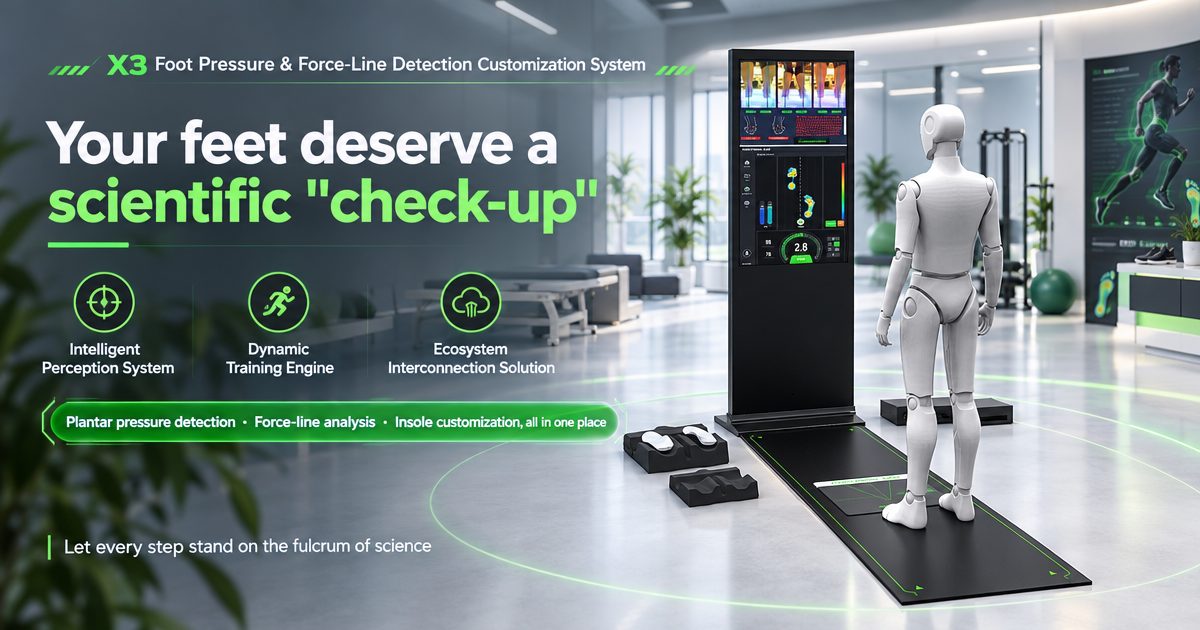
The visit itself is short and ordered. The person stands for the static pass, walks for the dynamic pass, then repeats the walk while the video records. The lower-limb alignment images are captured in the same block. The operator reads the report on screen with the customer present, and that is the part that turns a measurement into a conversation: here is where your weight sits, here is the line of your leg, here is the shoe we stock that suits it.
If the room has the customization module, the session can end with an insole rather than a suggestion. The kit ships with a heating box and a set of shaping pillows, and the build is chosen from the record and the shoe, heated, shaped, trimmed and checked inside the customer’s own footwear. The order of those steps is not negotiable. The shoe check comes before the shaping, not after, because a build that will not fit the shoe should never reach the heating box.
The operator question deserves more attention than it usually gets. In a clinic the person running the session may change from day to day; in a store it may be whoever is on the floor. On-screen prompts carry a lot of the routine and cannot carry all of it, which is why we ask buyers to name the operator before they name the model. A system only one person can run correctly is a system with a staffing problem built into it.
What varies between buyers is rarely the hardware and almost always the handover. Equipment minimum order is one unit and every unit runs a seven-day test before it leaves the plant, so the machine arrives proven; the risk sits with the people who will run it. Naming the second operator before the order is placed, and training them while the first one is still on site, is the cheapest thing a buyer can do in the whole project.
Two categories, and how to tell which one you are shopping for
One question sorts most enquiries, and it is not about the machine. Ask what the next step needs: a file or a decision. If the next step is a workshop shaping a shell against geometry, the answer is a file and the category is shape capture. If the next step is a conversation with a customer about load, arch behaviour, alignment and which shoe to try, the answer is a record and the category is what we build.
Buyers who should walk away from us: a laboratory that needs positive forms, an orthotics workshop that mills from a digital model, a footwear brand working on lasts, and anyone whose specification opens with a surface tolerance. None of those needs a pressure plate, and selling one into that workflow creates a gap nobody notices until the first production order is due. We would rather lose the quotation than carry that conversation later.
Buyers who fit the category: a podiatry clinic that wants load and alignment in the same record as the video, a shoe store that wants the fitting conversation to start from the customer rather than the shelf, a children’s fitness centre watching arch behaviour across growth, a foot therapy centre comparing visits. In each of those rooms the deliverable is a reading and a recommendation, and the record is what makes it repeatable.
The mistake to avoid is buying one category to answer the other’s question, then blaming the equipment when the answer does not appear. A pressure record will never contain a shape; a shape file will never contain a load path. A buyer holding both questions should expect two systems, or should start with the one the next appointment actually needs.
Frequently asked questions
Does the X3 do what a 3D scanner does?
No. In this market the label describes devices that capture the shape of a foot; the X3 records foot pressure, arch type under load, lower-limb biomechanical alignment and a back-and-forth gait video, and it customizes insoles on site. There is no surface model at the end of a session, and we do not present the system as a shape capture device.
What does a buyer usually mean by 3d foot pressure scanner?
Usually two things at once: a device that records where load sits under the foot, and a device that returns a model of the foot’s shape. The phrase carries both because listings borrow whichever word buyers type. Splitting the two before a quotation is the fastest way to avoid buying the wrong category.
Can a foot surface file be exported from the X3?
No. The record holds pressure values, arch type, alignment images and video. There is no mesh and no point set, so nothing can be sent to a milling bench for a shell. A buyer whose production depends on geometry needs a shape capture system, and we will say so in the first email.
What do the static and dynamic records actually contain?
The static record holds standing load distribution across both feet, contact area and a left-right comparison. The dynamic record holds the walking sequence: the order regions take load, how long each stays loaded, and the path of the centre of pressure. A gait video is captured alongside so the movement can be replayed.
How does the shoe recommendation work?
The system returns shoe models from a catalogue the store or clinic has entered, matched against the recorded data. It is a shortlist for the fitter to work from, not a decision. With an empty catalogue the panel returns nothing, which is why we ask buyers to plan the data entry before the first customer session.
How does the customer receive the report?
Three ways: by scanning a code, by giving an email address, or by taking a printout made on site. The report notes that the data is for reference, and the reading of it belongs to the professional running the session rather than to the software.
What are the order and support terms?
Equipment minimum order is one unit, and each unit is tested for seven days before dispatch. The warranty covers twelve months against non-human damage with free parts. Support runs through a dedicated group with our engineers, remote assistance and over-the-air updates; custom report layouts are quoted separately.
What we would do next
Write down the next step after the report prints. If it needs a file, tell us and we will point you towards the capture category that produces one, even though we do not sell it. If it needs a decision — which shoe to try, whether the arch behaviour changed since last season, what to build for this pair of feet — send us the room, the operator and the shoes your customers bring, and we will map a session onto it. The X3 system page lists the functions in the manual’s own wording.
If the phrase that brought you here was about shape, our article on plantar scanning as a search term covers the same distinction from the buyer’s side. Order, warranty and transit terms sit on the FAQ page, and the contact page reaches the team directly.
This article is intended for professional and educational reference. It is not medical advice. Foot assessment equipment produces measurements and images; clinical interpretation and any decision about care remain the responsibility of a qualified professional. Certification scope is limited to the documentation we hold: European Union certification and ISO quality system certification.